Compare

Rio vs ChatGPT

ChatGPT is the better thinker.Rio is where your day lives.

Last updated September 23, 2026

The short answer

ChatGPT fits when

you need to research, write, code, or think something through.

  • Deep research that cites its sources
  • Writing, code, images and voice
  • Apps for iPhone, Android, Mac and Windows

Rio fits when

you want one plan for your day that changes when you ask.

  • Everything on one day timeline
  • Say “move the dentist to Thursday.” It moves.
  • Free to start, no card

Same request, two outcomes

  1. YouFind me the best standing desk under $400.

    ChatGPTBetter here

    Deep research reads dozens of pages and gives you a shortlist with sources you can check.

    Rio

    Runs a quick web search inside the chat. Useful for a fact, not for real research.

    ChatGPT is clearly better here.

  2. YouRemind me every Monday at 9 to send the invoice.

    ChatGPT

    Creates a scheduled task. Every Monday at 9 you get a push notification or an email.

    Rio

    Creates a repeating reminder that sits on Monday’s timeline, next to your 10:00 call.

    Both do it. The difference is where the reminder shows up.

  3. YouMove my dentist to Thursday and push the report to Friday.

    ChatGPT

    Reads a connected Google Calendar. To change the event you need agent mode on a paid plan, or you do it yourself.

    RioBetter here

    Moves the appointment and the task in one go. Open Thursday and the dentist is already there.

    Rio does it in one step. ChatGPT needs agent mode or your hands.

  4. YouI want to run three times a week.

    ChatGPT

    Encourages you and can set a reminder. It has no habit tracker.

    RioBetter here

    Adds a habit with a three-a-week target, ticked off on the same day as your tasks.

    Rio keeps count. ChatGPT only reminds.

Detailed comparison
CriterionChatGPTRio
Your tasksNo task list of its own. Scheduled tasks are alarms, not a to-do listTasks in Areas and Projects, shown on the day they are due
Your calendarReads a connected Google Calendar. Changing events is documented only for Business and EnterpriseIts own calendar: creates, moves and cancels events when you ask. Google Calendar sync is coming soon
RemindersScheduled tasks by push or email, with a cap per planOne-off and repeating reminders on your day timeline
HabitsNoneDaily or weekly targets, on the same day as your tasks
MemoryRemembers you across chats. You can see and edit itRemembers what you tell it and uses it when planning
Research and writingDeep research with sources, long drafts, code, imagesA quick web search in chat. Not a research tool
Where you use itWeb, iPhone, Android, Mac and Windows appsWeb, your phone’s browser, and the Android app. iPhone app coming soon
PriceFree plan, plus paid plansFree, no card needed. Pro at $10 a month is not open yet

What ChatGPT does better

Almost everything that is about thinking. ChatGPT is a far stronger general model: research with sources, long writing, code, data, images, and a voice you can talk to. It has polished apps on every device, and on paid plans agent mode can browse a site and fill in a form for you.

If most of what you need is answers and drafts, use ChatGPT. You don’t need Rio.

Where Rio is better

Holding the plan. Your tasks, events, habits and notes sit on one day, and one sentence changes them. Tell Rio “move the dentist to Thursday” and Thursday updates. There is nothing to copy into another app.
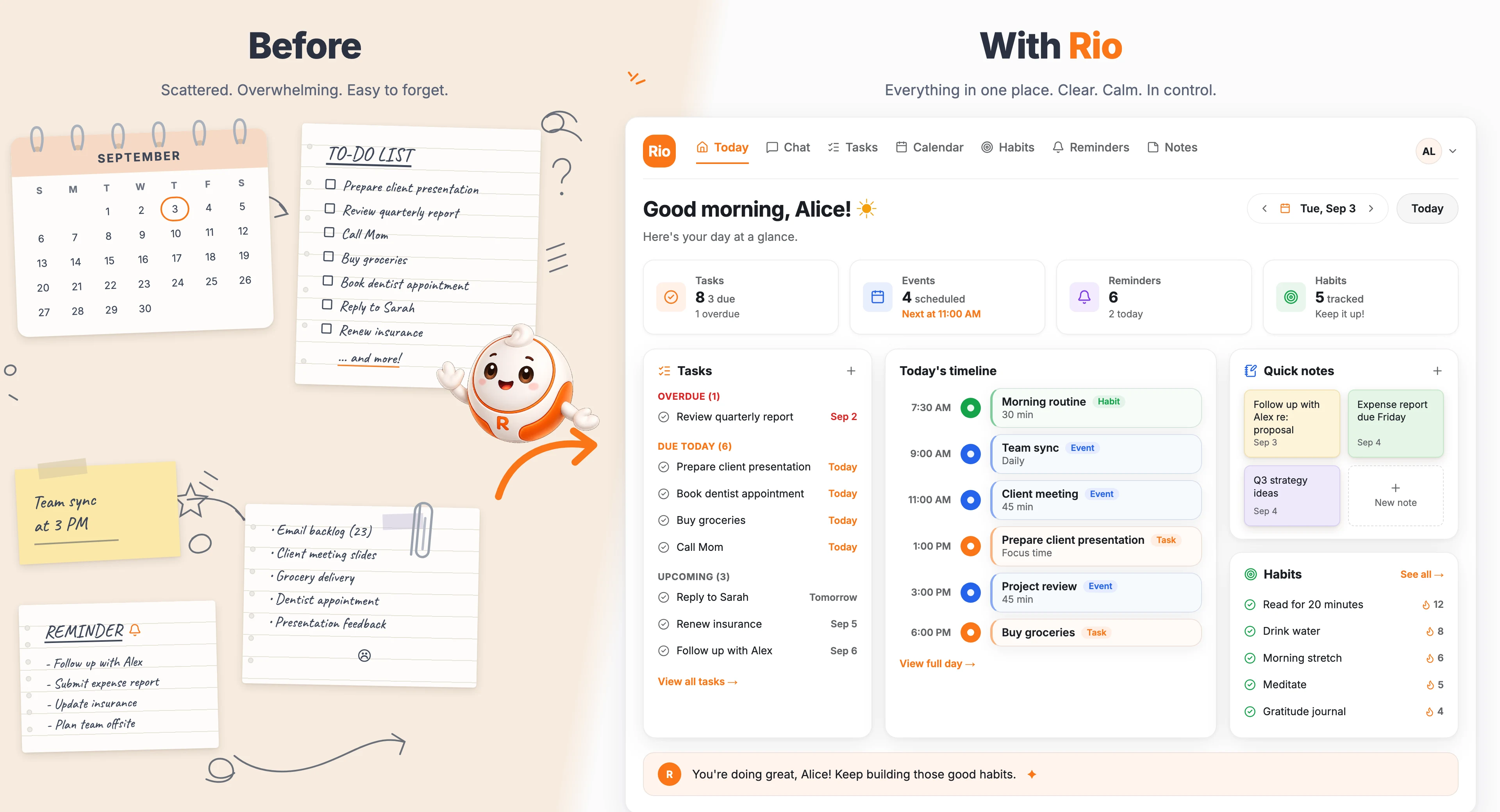
Left: a paper calendar, a hand-written to-do list and sticky notes spread across a desk. Right: Rio's Today screen holding the same day as one task list, a timeline, notes and habits.
The same day, before and after Rio. The right side is drawn from Rio’s Today screen.

Using both

Think it through in ChatGPT, then keep the result in Rio. On a paid ChatGPT plan, add Rio’s MCP connector in developer mode and that last step happens without leaving ChatGPT.

  1. You“Plan my move: what has to happen, in what order?”
  2. ChatGPTWrites the checklist and the order of steps.
  3. Rio“Add these to my next two weeks.” The tasks land on real days.
Plan in ChatGPT, keep it in Rio

Which one should you pick?

Pick by where your commitments live. If they sit in a to-do app and a calendar you keep in sync by hand, Rio replaces that work. If they live in your head and you mostly want a sharp thinking partner, ChatGPT is enough. Rio is new and smaller: no iPhone app yet, and no Google Calendar sync yet. If you need either today, wait for them or use something else.

Also see AI personal assistant, and the guide on AI personal assistant vs chatbot.

Frequently asked questions

Why use Rio if ChatGPT is free?

Rio is free to start too, and it needs no card. You would use it for a different job: ChatGPT gives you answers, Rio keeps the plan those answers turn into. If you never lose track of tasks or appointments, ChatGPT alone is enough.

Is ChatGPT a personal assistant?

Partly. ChatGPT remembers context, runs scheduled tasks, and can read connected apps such as Gmail and Google Calendar where your plan allows. It has no task list, habit tracker, or day view of its own, so your plans still live somewhere else.

Can ChatGPT manage my calendar?

It can read Google Calendar once you connect it. OpenAI documents creating and moving events only for Business and Enterprise workspaces, where an admin turns it on. Check OpenAI's help center for what your plan allows.

Does Rio connect to Google Calendar?

Not yet. It is coming soon. Today Rio keeps its own calendar: it creates, moves and cancels events inside Rio, on the same timeline as your tasks.

Can I use Rio inside ChatGPT?

Yes, on ChatGPT's paid plans. Turn on developer mode in ChatGPT on the web, then add Rio's MCP connector. After that you can ask ChatGPT to add something to your Rio day without switching apps.

Related: Rio vs Notion · Rio vs Todoist · Rio vs Motion · Rio vs Meta Muse · Rio vs Sunsama

Want the answer to land in tomorrow’s plan, not in a chat you will scroll past?

Try Rio free.

Start for free