Model Context Protocol
Connect your AI assistant to Rio via MCP
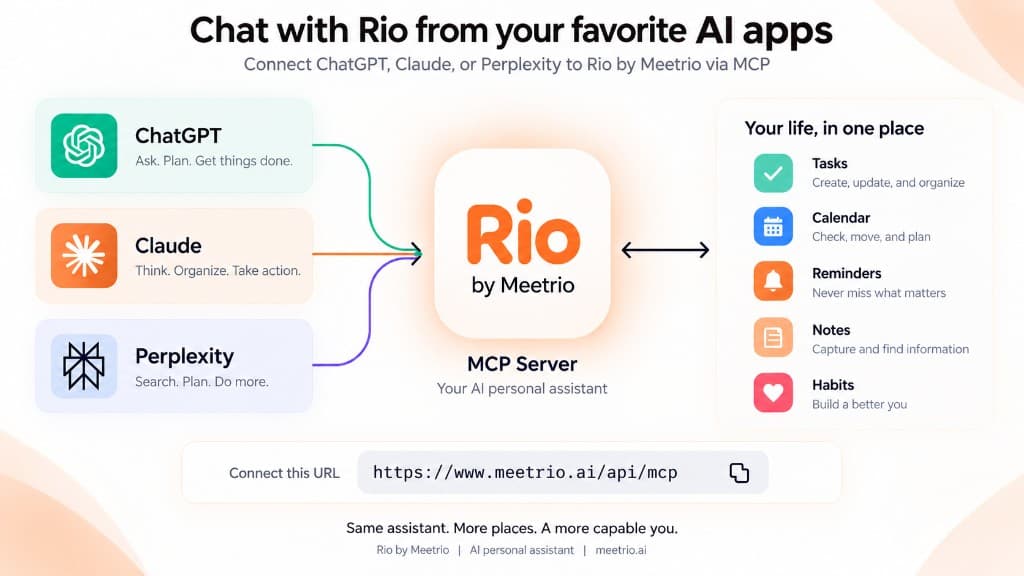
Use Rio inside ChatGPT, Claude and Perplexity. Once you sign in, your AI app can read your agenda and change it when you ask.
https://www.meetrio.ai/api/mcpAI assistant integration
Why connect Rio to your AI model?
General-purpose AI assistants know everything about the web, but nothing about your day. They cannot tell if you are free at 2pm on Thursday, cannot check your deadlines, and cannot move your workout when a meeting runs late.
Connect Rio over MCP and they can see your real tasks, calendar, habits and notes — and change them when you ask.
Tool Catalog
Two tools. Complete control of your day.
One tool reads. One tool makes changes. Your AI app knows which is which.
Reads your tasks, calendar events, reminders, habits and notes. Changes nothing.
Example queries
- “What does my afternoon look like?”
- “Do I have any tasks due for the Q3 review?”
- “When is my dentist appointment next week?”
- “What notes did I take during the landlord call?”
Makes the changes you ask for in plain words: creates tasks, schedules events, sets reminders, and moves or cancels existing plans.
Example actions
- “Block 2 hours tomorrow afternoon for deep work”
- “Remind me Friday at 9am to submit corporate tax filings”
- “Move my morning sync to 11:30am and clear my 10am slot”
- “Capture a note: client agreed to contract terms on Tuesday”
How to connect
Three quick steps to link Rio
- Copy Rio's MCP endpoint URL — Copy Rio's endpoint: https://www.meetrio.ai/api/mcp.
- Configure your AI client — Add Rio as a custom remote MCP connector in Claude, ChatGPT (developer mode), or Perplexity. The client must support Streamable HTTP and OAuth.
- Authenticate with OAuth — Log in with your Meetrio account and grant the rio:mcp scope to allow your AI assistant to read or update your agenda.
Claude
Connect via Claude’s remote custom connectors across web, desktop, and mobile.
- Pro/Max: Customize > Connectors, then + > Add custom connector. Team/Enterprise owners: Organization settings > Connectors > Add > Custom > Web.
- Enter URL
https://www.meetrio.ai/api/mcpand click Add. - Sign in with your Meetrio account. Team members click Connect on the connector their owner added.
- Enable Rio in the conversation via + > Connectors.
Checked 2026-09-08 per Claude Remote Connectors. Organization accounts may require workspace owner/admin approval.
ChatGPT
Connect Rio via ChatGPT developer mode and custom app connectors.
- In ChatGPT web, open Apps > Create app (requires developer mode on supported plans).
- Enter endpoint URL
https://www.meetrio.ai/api/mcpand run the tool discovery scan. - Authorize with OAuth 2.0 PKCE with the
rio:mcpscope. - Select and enable the Rio connector inside your chat session.
Checked 2026-09-08 per ChatGPT Developer Mode. Account access, admin policies, and tool write permissions vary by plan.
Perplexity & Others
Connect via Perplexity custom remote connectors or any client with Streamable HTTP + OAuth support.
- In Perplexity, navigate to Account settings > Connectors.
- Click Custom connector and select Remote.
- Choose OAuth and Streamable HTTP, then enter
https://www.meetrio.ai/api/mcp. - Click Add, then open the connector card to authenticate with Rio.
Checked 2026-09-08 per Perplexity Custom Remote Connectors. Clients connecting to Rio must support Streamable HTTP and OAuth 2.0 PKCE.
Frequently asked questions
What is Rio?
Rio is the AI personal secretary inside Meetrio. It manages your daily timeline, tasks, calendar events, habits and notes in one place.
What is the Model Context Protocol (MCP)?
The Model Context Protocol (MCP) is an open standard that enables AI models like Claude, ChatGPT, and Perplexity to securely interact with external tools and personal data sources.
What tools does the Rio MCP server provide?
Rio exposes two primary MCP tools: ask_rio for querying your calendar, tasks, habits, and notes (read-only), and tell_rio for creating tasks, scheduling events, setting reminders, and updating notes (write).
How is my personal data secured over MCP?
Access to your personal data requires OAuth authorization. Rio verifies access tokens and isolates your account's data. tell_rio can modify your data; confirmation prompts depend on your AI client's permission settings.
Can I use Rio MCP with multiple AI clients?
Yes. You can connect the same Rio MCP endpoint to Claude, ChatGPT, and Perplexity at once. Other clients work only if they support Streamable HTTP and OAuth 2.0 PKCE. All connected clients share your single Meetrio agenda.
Ready to connect Rio to your AI?
Bring tasks, calendar events, habits, and notes directly into your AI conversations.
Start for free